Garage Door Opener Troubleshooting: Common Problems And Safe Fixes
Start with the simple checks: power, remote batteries, wall control wiring, lock or vacation mode, safety sensor alignment, and whether the problem is the opener or the garage door itself. Do not loosen torsion springs, extension springs, lift cables, bottom brackets, or other high-tension door hardware as a casual DIY repair.
Quick Troubleshooting Table
| Symptom | Safer first checks | When to stop and call a pro |
|---|---|---|
| Door only closes while holding the wall button | Clean the photo-eye lenses, remove obstructions, check sensor alignment, and look for cut or loose sensor wires. | If sensors have no power after wiring checks, if the opener reports a sensor fault you cannot clear, or if the door reverses unpredictably. |
| Opener does not respond to remote or wall control | Check outlet power, breaker/GFCI, opener lock mode, remote battery, and whether the wall control is lit. | If the opener smells hot, trips power, has visible board damage, or requires internal electrical diagnosis. |
| Trolley moves but the door does not | Confirm the emergency release is re-engaged and inspect the trolley/rail from the floor. | If the door is heavy by hand, crooked, stuck, or the spring/cable system looks damaged. |
| Grinding noise or motor runs without door movement | Stop using the opener and inspect for a stripped gear, loose chain/belt, or jammed rail. | If the door cannot be moved smoothly by hand or the repair requires spring, cable, or counterbalance work. |
| Lights do not turn on | Use opener-approved bulbs, check the socket tab only with power disconnected, and review the manual for LED compatibility. | If the socket is burned, wiring is damaged, or the logic board appears faulty. |
Related GarageSanctum guides: compare garage door openers, review universal garage remotes, learn about smartphone garage controls, or choose the right garage door lubricant.
Door Only Closes When You Hold The Wall Button
This usually points to the safety reversing sensor system, not the wall button itself. Check for boxes, tools, sunlight glare, spider webs, dirty lenses, loose brackets, misalignment, and damaged low-voltage wires. If one sensor LED is off or flickering, Chamberlain’s troubleshooting guidance points to obstruction, misalignment, a faulty sensor, or a short/broken sensor wire. If both LEDs are off, check sensor wiring and opener power before replacing parts.
Garage Door Opener Does Not React To Any Command
Start with power. Confirm the opener is plugged in, the breaker or GFCI is not tripped, and the wall control is not in lock or vacation mode. Replace remote batteries and test a second remote if you have one. If the wall control is dead and the outlet has power, the issue may be wiring, a wall control, transformer, logic board, or motor unit fault.
Trolley Moves But The Door Stays In Place
The emergency release may be disconnected, or the trolley/attachment point may be damaged. Reconnect the release only after the door is fully closed or safely supported. If the door feels unusually heavy, crooked, jammed, or drops when moved by hand, stop using the opener and call a garage door professional.
Grinding Sound And Door Does Not Move
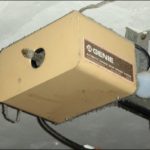
A grinding opener can mean stripped drive gears, a loose chain or belt, a jammed rail, or an opener trying to move a door that is not balanced. Do not keep pressing the remote. Continuing to run the opener can damage the motor or rail and can hide a door balance problem.
Wall Switch Does Not Work
If remotes work but the wall control does not, inspect the wall-control wiring for loose or damaged connections with power disconnected. Some wall controls have lock features that disable remotes. If neither wall control nor remote works, treat it as a power, wiring, or opener-unit problem instead of replacing the wall switch first.
Lights Will Not Turn On
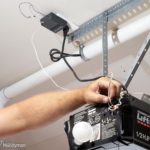
Try opener-approved bulbs and check the opener manual for LED compatibility. Some openers are sensitive to bulb type or radio-frequency interference. If the light socket looks scorched or loose, disconnect power and stop troubleshooting at the socket level.
Remote Controller Does Not Work
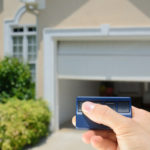
Replace the battery, check that the opener is not in lock mode, and reprogram the remote using the opener’s manual. If one remote works and another does not, the failed remote or its programming is the likely issue. If no remote works but the wall control works, the opener’s receiver, antenna, or logic board may need service.
Preventing Repeat Opener Problems
Test the auto-reverse and photo-eye system according to the opener manual, keep the sensor path clear, lubricate the door hardware with an appropriate garage door lubricant, and listen for changes in noise. The opener should not be used to force a heavy, binding, or unbalanced door.
When You Should Call A Professional
Call a professional when the problem involves springs, cables, bottom brackets, a door that is off track, a door that feels too heavy by hand, damaged panels that affect movement, opener electrical faults, or any safety sensor problem you cannot restore. Garage doors are heavy, and the counterbalance system stores enough force to make casual repair unsafe.
Source Notes Used For This Refresh
- Chamberlain troubleshooting guidance lists obstruction, misalignment, faulty sensors, and short or broken sensor wiring as causes when safety sensor LEDs are off or flickering.
- CPSC garage door opener rules added entrapment-protection requirements for residential automatic openers in the early 1990s.
- UL Standards and Engagement describes modern residential garage door operators as using more than one entrapment protection mechanism, including inherent reversal plus an external eye or edge sensor.